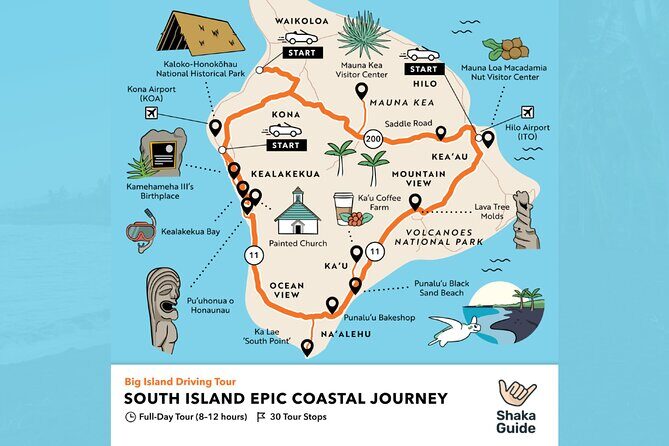
REVIEW · BIG ISLAND OF HAWAII
Big Island – Hawaii Volcanoes National Park Driving Tour
Book on Viator →Operated by Shaka Guide Apps · Bookable on Viator
A volcano park lesson, narrated as you drive. This self-guided Hawaii Volcanoes National Park driving tour turns a long loop into something you can actually follow, with hands-free GPS audio that plays as you move and tells you what you’re seeing. I like that it gives turn-by-turn directions plus offline maps, so you are not stuck squinting at signals. I also like the mix of stories, Hawaiian myths, and music that makes the drive feel like a guided lesson. The one catch: park entrance fees are not included for most stops, and you’ll want to download the tour ahead of time because service can get spotty.
If you already have a rental car, this is one of the easiest ways I know to get value out of Volcanoes National Park. The price is per group (up to 15 people), and the audio content is available for later too since the tour never expires. One practical consideration: the audio follows a route, so if you start making big detours, you can confuse the GPS guidance and miss key sections.
In This Review
- Key highlights before you go
- Turning your car into a guided lesson inside Volcanoes National Park
- What you actually get: offline maps, GPS turn-by-turn, and lifetime audio
- Price and value for $18.39 per vehicle (and what it doesn’t cover)
- The Day 1 driving loop: crater rim to sea arch
- Stop 1: Hawaii Volcanoes National Park (the crater “orientation” hour)
- Stop 2: Nahuku–Thurston Lava Tube (short visit, big payoff)
- Stop 3: Kilauea Iki Trail (feel the crater floor)
- Stop 4: Chain of Craters Road (built-in break time)
- Stop 5: Devastation Trail (the story of land forming again)
- Stop 6: Pu‘u Loa Petroglyphs (culture markers + heat management)
- Stop 7: Holei Sea Arch (90 feet of ancient lava work)
- Day 2: a second visit window for the park’s main area
- How to make the GPS audio work for you (not against you)
- Stop pacing: why these durations are actually a good thing
- Who should book this driving tour?
- Should you book this Hawaii Volcanoes National Park driving tour?
- FAQ
- Is park admission included in the driving tour?
- How long is the tour?
- Does the tour work offline?
- Do I need to download the tour before I arrive?
- How do I start the tour?
- Is the audio automatic while I drive?
- Can I pause and resume the tour?
- How is the price calculated?
- Do the tours expire?
- What’s the cancellation window?
Key highlights before you go
- Automatic, GPS-activated audio so you can focus on the road and pullouts
- Offline island map + offline touring so weak signal is less of a problem
- Stop-by-stop stories and history tied to what you’re looking at, not generic park facts
- Lifetime access to the audio file so you can replay later
- Customizable start time and suggested pace (you can pause, resume, and explore at your own speed)
- Good value for a car group since it’s a single tour per vehicle, not per person
Turning your car into a guided lesson inside Volcanoes National Park
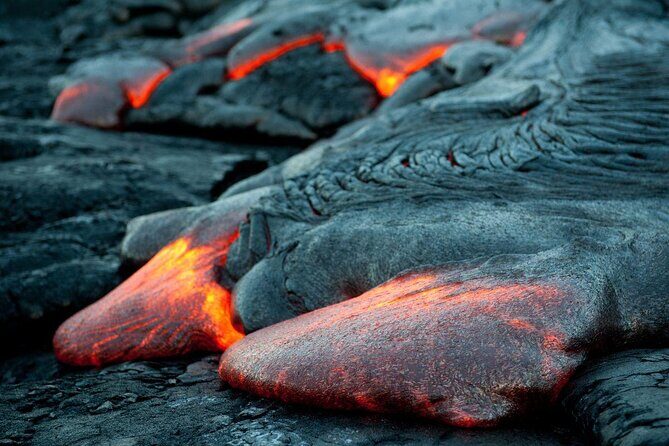
Hawaii Volcanoes National Park can feel big and “okay, what am I actually supposed to notice?” This driving tour helps solve that. Instead of reading every sign, you get a virtual tour guide in audio form—stories, history, and music—matched to where you are as you drive.
What makes it practical is the hands-free setup. You download the tour, open the app at the right starting point, and the narration plus directions are triggered by GPS as you move. So you can do the classic Hawaii thing: stop often, look longer, and not feel rushed by a bus schedule.
This is also built for real life logistics on the Big Island. The tour is private to just your group, and it’s priced for a whole vehicle (up to 15 people). If you’re traveling with family or friends in one car, the “cost per person” stays low compared to the usual per-person guided tours.
Other Volcanoes National Park tours in Big Island of Hawaii



What you actually get: offline maps, GPS turn-by-turn, and lifetime audio
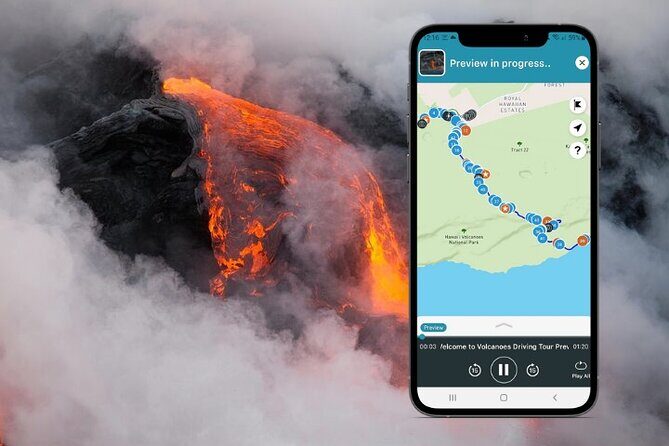
Here’s the value package in plain terms:
- Turn-by-turn GPS directions that tell you when to turn and where the next stop is
- Offline maps so you’re not dependent on cell coverage while driving
- Audio narration (3–5 hours total) that plays automatically as you drive
- The ability to pause and resume so you can take breaks without losing the thread
- Offline capability plus lifetime access (the tour never expires), which is great if you want to revisit later or re-listen on a second pass
You’ll also get tour highlights plus activity and restaurant recommendations. That part can be genuinely useful when you’re deciding where to grab something after a hike, or what to do with the rest of your day.
Price and value for $18.39 per vehicle (and what it doesn’t cover)
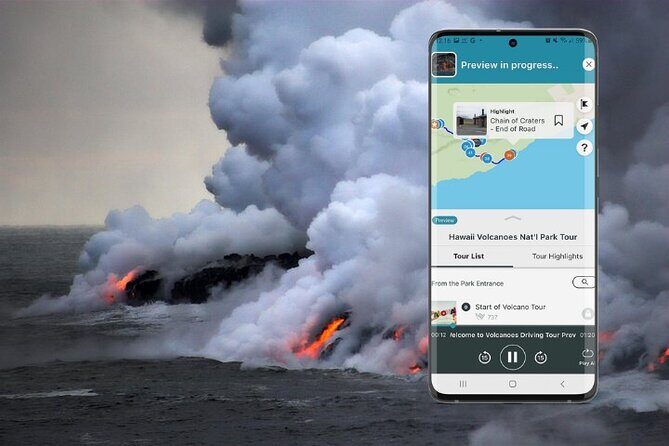
The headline price is $18.39 per group (up to 15). That’s unusually simple. In practice, this works best if you have at least a couple people sharing the car, because it avoids per-person markups.
There’s also a common value trap to watch for: entrance fees are not included for most stops. So you’re paying for the self-guided tour experience, not the park ticket itself. Plan your budget with the reality that you’ll still need to handle park admissions where required.
One stop note worth knowing: on the second day, the main park stop is listed as admission ticket free. For everything else in the route, the admission ticket is listed as not included.
The Day 1 driving loop: crater rim to sea arch

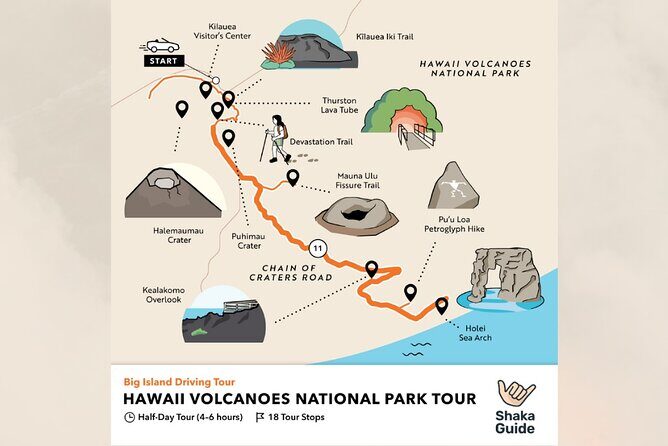
Day 1 is the “greatest hits” day, with a series of short-to-medium stops. The total time is approximate, but the stop durations are built for real park pacing: drive a bit, park, walk a short segment, listen, then move on.
You start in the main area of Hawaii Volcanoes National Park, then go through a classic sequence:
- Nahuku – Thurston Lava Tube
- Kilauea Iki Trail
- Chain of Craters Road
- Devastation Trail
- Pu‘u Loa Petroglyphs
- Holei Sea Arch
The big idea is that the audio keeps you from treating the drive like just scenery. You’re learning what you’re looking at—lava formations, changes in the land, and cultural markers—while you’re actually in front of them.
Stop 1: Hawaii Volcanoes National Park (the crater “orientation” hour)
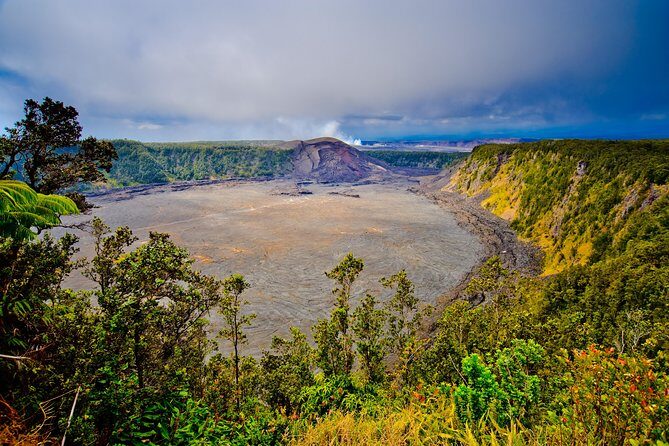
This is your foundation stop: about 1 hour where you get views and the park’s crater area framed with Hawaiian myths and legends.
Why this matters: Volcanoes National Park isn’t one single attraction. It’s a living story of geology. If you do this first, the rest of the loop makes more sense, because the audio gives context before you walk into the more specific landmarks.
Practical note: the tour is designed for self-paced exploring, but you still want to use this hour to get your bearings—mentally and literally—so the later directions and narrations feel logical.




Stop 2: Nahuku–Thurston Lava Tube (short visit, big payoff)
Next comes the Nahuku – Thurston Lava Tube, a popular stop for a reason: you get the chance to experience how lava shaped space long after the flow.
Time on this stop is listed at 30 minutes. That’s enough to see what you came for without turning the day into a hiking marathon.
A smart tip from on-the-ground experience: take the first parking spot you see for this stop. It can save you time on a day when you’re bouncing between short attractions.
Stop 3: Kilauea Iki Trail (feel the crater floor)
Then you head to Kilauea Iki Trail, also listed for about 30 minutes. This is the crater-floor walk portion where the audio is meant to connect the physical landscape to what the volcano has been doing over time.
The key here is expectations. This is a trail stop, but the tour time you’re given is short. So come prepared to do a focused walk, not a long trek. If you want extra time, you can pause the audio and stay longer, but treat the listed stop time as the default plan.
Stop 4: Chain of Craters Road (built-in break time)

Chain of Craters Road comes next with about 30 minutes for a break. This is a good moment to step out, grab a photo, stretch, and rehydrate.
Why I like this section: the audio isn’t only about “what is that?” It’s also about what’s worth slowing down for. That helps you know when a stop is a quick check and when it’s a “take your time” moment.
Stop 5: Devastation Trail (the story of land forming again)

Next is Devastation Trail, listed for about 30 minutes. The description focuses on how new mountains form from what’s left behind—mother nature doing her slow, serious work.
This stop is one of those that can feel emotional if you let it. The audio is designed to bring the geology back down to a human scale: what you’re seeing is change, not just destruction.
Practical downside to keep in mind: trail areas can be uneven or hot depending on the day. This is where you’ll appreciate pausing the tour if you need a breather.
Stop 6: Pu‘u Loa Petroglyphs (culture markers + heat management)
At Pu‘u Loa Petroglyphs, the tour calls out a walk around about 23,000 petroglyphs made prior to Western contact. Stop time is listed as 15 minutes.
That’s short, but it’s also a good length for a first pass—enough to see the rock markings without turning it into a long hike.
One practical tip that matters here: bring water, especially if you’re walking in heat. Even though it’s a short stop, the Big Island sun can feel intense, and you don’t want to cut the visit short because you waited too long.
Stop 7: Holei Sea Arch (90 feet of ancient lava work)
The final stop is Holei Sea Arch, listed for 30 minutes. The description says it’s a towering 90-foot sea arch formed from an ancient lava tube, roughly 500 years ago.
This is the kind of stop that feels “movie-sized” even if you’ve seen photos. The audio adds meaning by tying the shape to the lava story, not just to the final result.
Photo tip: plan to spend your time looking both at the arch itself and the surrounding coastline rock shapes, since the whole area tells the story of how the lava tube became something you can view today.
Day 2: a second visit window for the park’s main area
Day 2 repeats the main Hawaii Volcanoes National Park stop (listed 1 hour, with admission ticket free). On paper, that can look redundant.
In real life, it’s useful if you did not fully cover the crater area on Day 1, or if you want more time to sit with the audio stories in quieter moments. Since the tour supports pausing and resuming, it’s also a good option if your timing on Day 1 was tight.
If your schedule is tight, you can think of Day 2 as your safety net: extra time for the part of the park that benefits most from learning first and wandering after.
How to make the GPS audio work for you (not against you)
This tour shines when the audio can match your movement to the route. A few things can make or break the experience:
- Download ahead on strong Wi-Fi. The guidance explicitly says to download the tour using strong Wi-Fi before you go. Inside Volcanoes National Park, you can run into weak signal, and the “download while driving” idea is where frustration starts.
- Use location permissions and keep the app updated. If your phone’s permissions are off, GPS-triggered audio may lag or fail.
- Follow the suggested route order. The audio is tied to GPS progress. If you manually choose roads that skip ahead, it can end up confusing the sequence and making you feel like you missed parts.
- Expect service hiccups on your phone. One theme from real-world use is that stopping and restarting can sometimes cause the audio experience to act inconsistent if the app loses its state. The fix is usually simple: check permissions, keep the app updated, and give yourself a moment when you park.
The easiest prevention plan is boring but effective: do the download at home, test the audio from the starting area, and keep your phone charged.
Stop pacing: why these durations are actually a good thing
A lot of “tour audio” products are either too long (you can’t stop) or too short (you barely learn anything). This one uses realistic stop times—often 15 to 30 minutes—so you can see and do without turning every pullout into a commitment.
It also helps you structure your day. If you’re the type who can spend an hour at one viewpoint, you can pause the narration and stay longer. If you’re the type who wants to check off highlights quickly, the audio gives you a path.
Either way, the flexibility is the point: you’re not locked into a bus route, but you still get guidance.
Who should book this driving tour?
This is a strong match if:
- you have a rental car and want a self-guided Hawaii Volcanoes National Park driving tour
- you like learning while you travel, especially Hawaiian myths and the way geology connects to culture
- you want offline reliability via offline maps and audio that doesn’t demand constant data
- you’re traveling in a group and want a single tour cost per vehicle
It may feel less ideal if:
- you’re hoping for a full-on guided hike experience (this is still a driving route with short stop walks)
- you are trying to depend on downloading once you arrive and realize you have weak Wi-Fi or dead signal
Should you book this Hawaii Volcanoes National Park driving tour?
Yes, I’d book it if you want to get more meaning out of Volcanoes National Park without joining a bus and without fighting paper maps. The best reason is simple: the GPS-activated audio plus offline map combo turns your car time into learning time, and it’s priced like a “value add,” not a premium guided tour.
Before you go, do two things: download on solid Wi-Fi at home, and keep your phone permissions and charge in good shape. If you set it up once and follow the suggested route order, you’ll likely feel like your visit is timed, guided, and much more interesting than just driving from stop to stop.
FAQ
Is park admission included in the driving tour?
Admission fees are not included for most stops. The main Hawaii Volcanoes National Park stop on Day 2 is listed as admission ticket free, but other stops show admission ticket not included.
How long is the tour?
The overall experience is listed as about 2 days, with audio content totaling about 3–5 hours. Each stop also has its own time estimate.
Does the tour work offline?
Yes. It includes offline maps and offline-capable audio narration, so you do not need continuous Wi-Fi or data to use it.
Do I need to download the tour before I arrive?
Yes. The guidance says to download the tour using strong Wi‑Fi before driving, since service can drop in the park area.
How do I start the tour?
You launch it in the Shaka Guide app using the redeem code sent by email. Then you select the tour starting point and follow the GPS instructions.
Is the audio automatic while I drive?
Yes. The narration plays automatically as you drive and uses GPS to trigger stories, directions, and music.
Can I pause and resume the tour?
Yes. You can start, pause, and resume on your schedule.
How is the price calculated?
It is priced per group (up to 15). The tour is designed as one tour per vehicle, so it is cost-efficient compared with per-person pricing.
Do the tours expire?
No. The tours never expire, and you have lifetime access to the audio files.
What’s the cancellation window?
You can cancel for a full refund up to 24 hours in advance of the experience’s start time. Changes within 24 hours are not accepted for a refund.